


TL;DR: if you’re an analogue DJ embracing digital don’t add a controller to the mixer you already possess, spend the money on a replacement digital mixer with analogue inputs instead.
I’ve written a series of articles previously on how I produce live and recorded content. In this article I’m going to delve into audio, a key aspect I haven’t covered previously.
Good audio quality is more important than video in podcasting. Often the audience isn’t even watching, they’re listening while they’re doing something else. Poor video quality is forgivable but audiences tend to switch off when the audio is sub-optimal.
For conversations great audio is relatively easy to achieve - use quality microphones and an audio interface, and learn how to configure and apply filters such as Gain, Compressor, Expander, Limiter, Noise Gate and Noise Reduction. I’m not going to cover these subjects, instead I’m going to describe how I include music in my broadcasts as a demonstration of what not to do.
Let’s begin with some diagrams so I can walk you through how I got here. First is the Optimal State - this is how my audio configuration would look if I was designing it from scratch: simple and reliable.
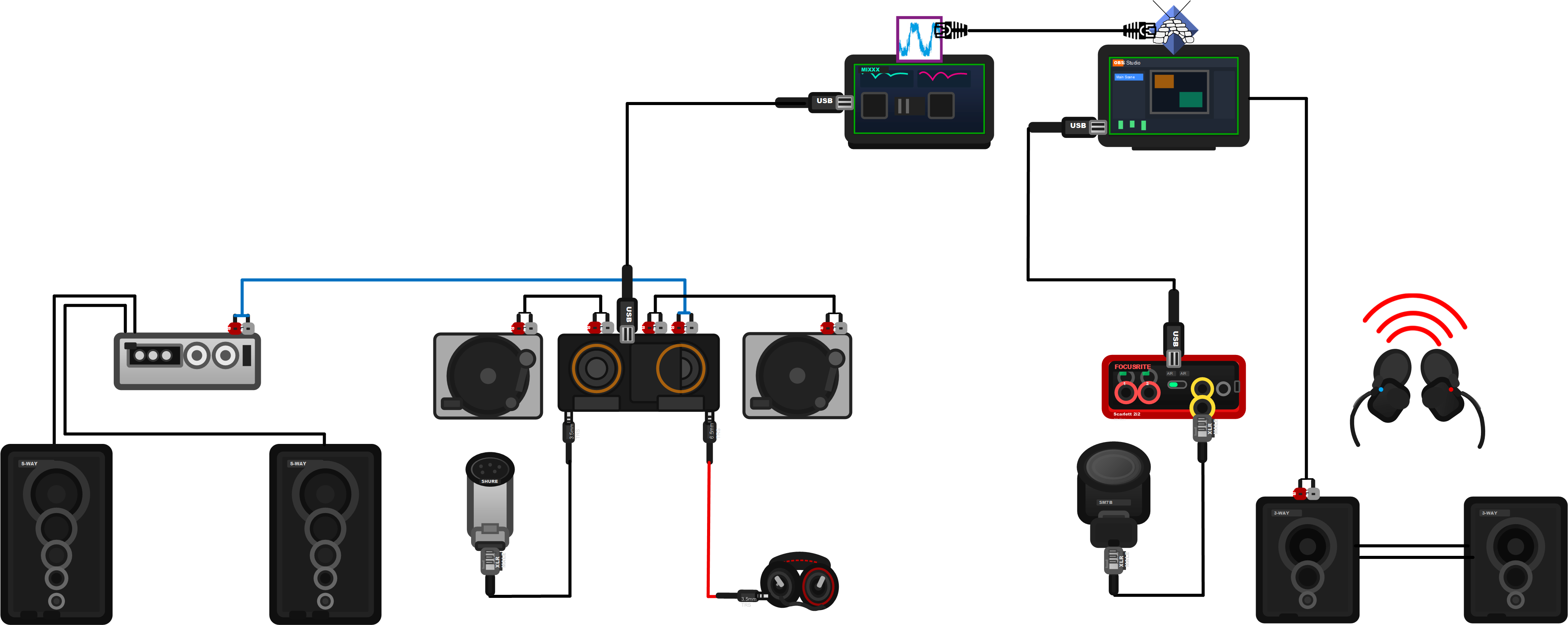
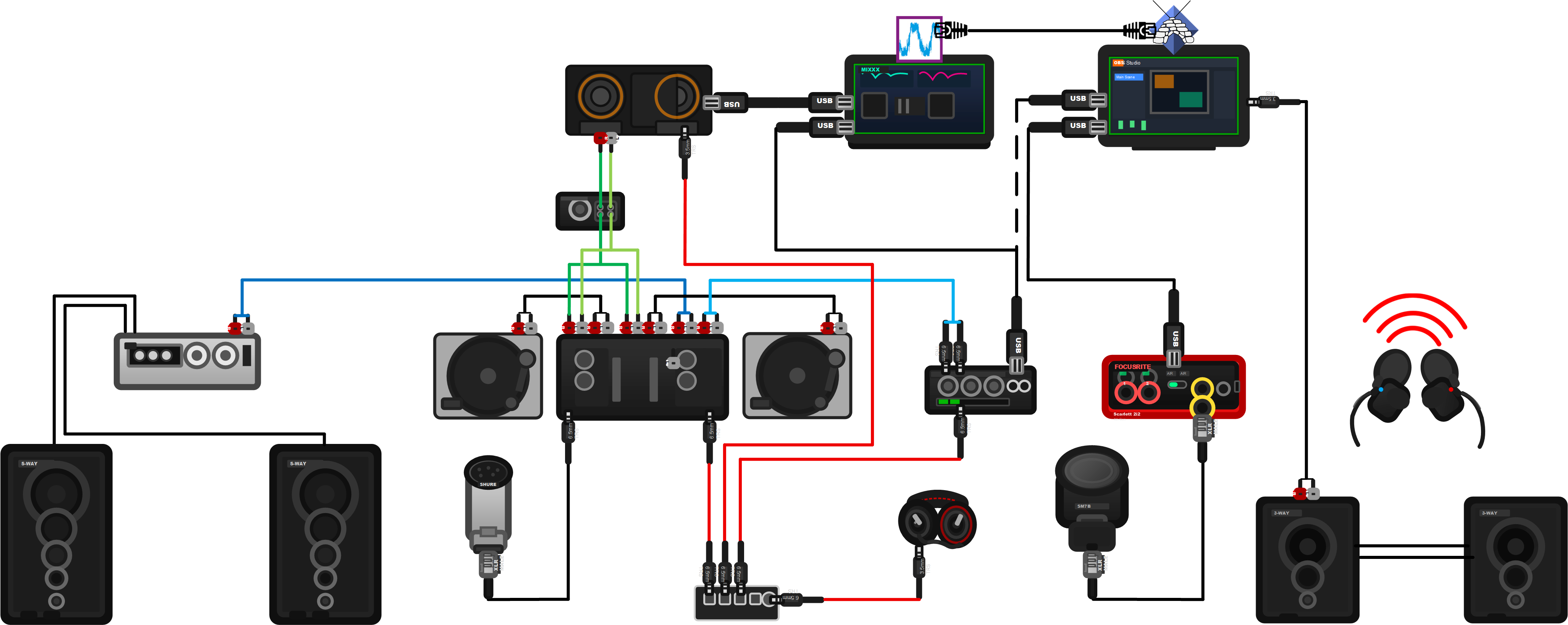
Below is the Current State - how my audio set-up actually is. I arrived at this destination through a philosophical commitment to recycling components instead of replacement, amalgamating the modular solutions I had in place and augmenting their capabilities where necessary.
Evolution, in other words, rather than revolution.
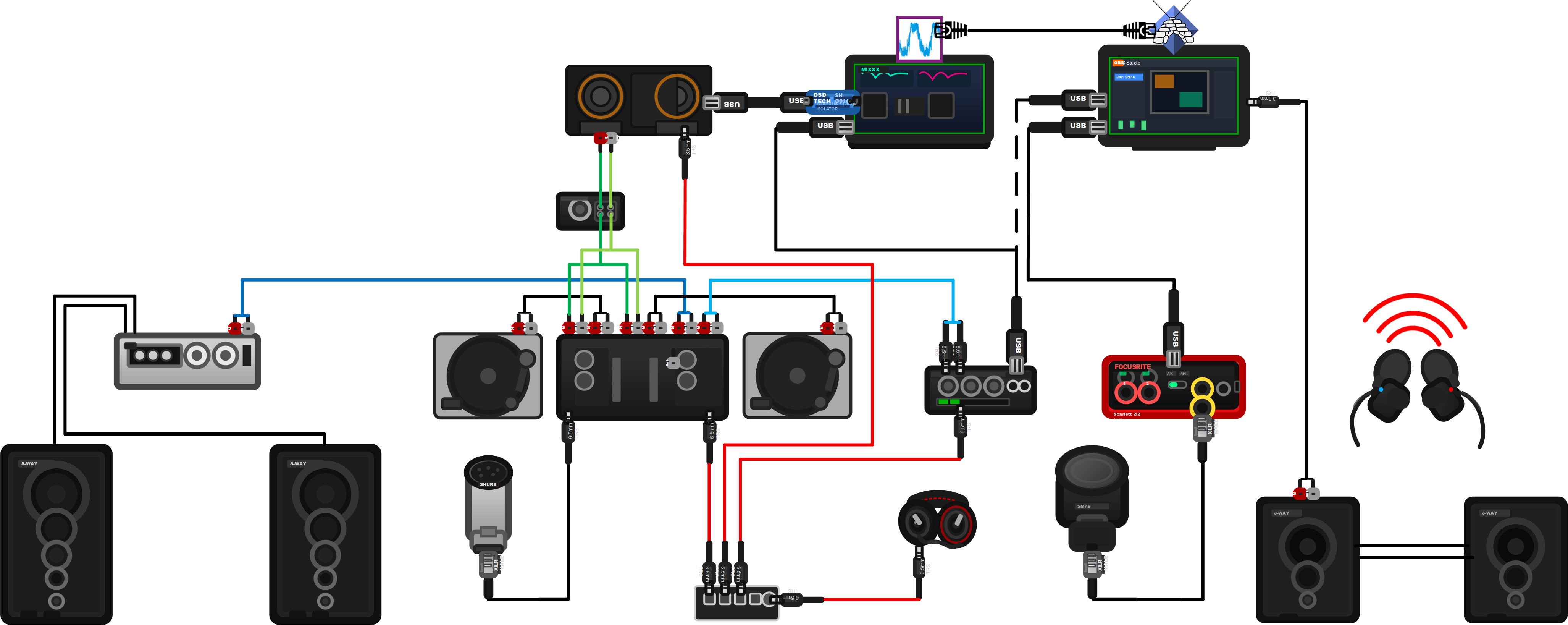
These two diagrams are probably difficult to interpret because I haven’t labelled the components. Conceptually you’re seeing three discrete modules amalgamated so I can broadcast analogue and digital music, and mix it together.
I’ll show you below how I got here.
Starting with the Analogue Module, a standard stereo configuration everyone has always had. An amplifier and speakers connected to an audio source - in my case a couple of turntables and a mixer. With the addition of a microphone and headphones this is the standard configuration for every bedroom DJ (or at least it was until the advent of Digital DJing.) In my case I’ve owned most of this kit for three decades.

When I started podcasting I needed to present good vocal audio so I built myself an entirely separate Podcasting Module connected directly to my workstation.
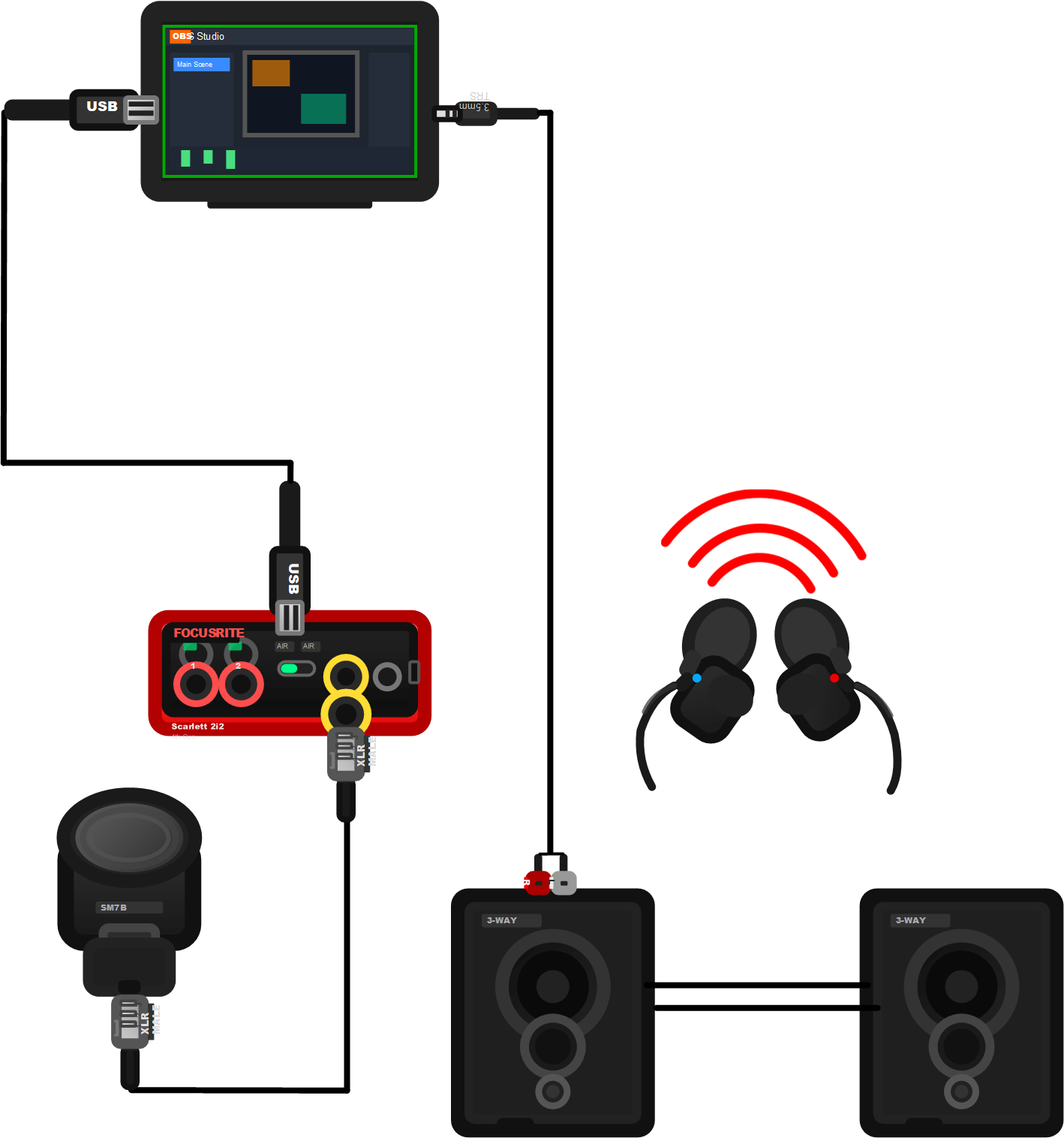
This separation makes sense because the stereo (Analogue Module) is in the lounge whereas I podcast from my home office, a different room. The module comprises just a microphone and an audio interface for input and speakers and earpieces for monitoring. They’re directly connected to my workstation so that I can broadcast and record content in OBS.
So far so good. I wouldn’t do this any differently.
I’ve been holding out against digital music for a long time and finally caved. This is point at which I made the calamitous decision to integrate a discrete Digital Module. This comprises a digital controller and another workstation to run the DJing software, Mixxx. It has RCA outs for the main audio and a headphone jack. It’s also located in the lounge, where it can readily connect to the existing stereo equipment a.k.a the Analogue Module.

What I should have done is replace my existing analogue mixer with a digital mixer which has analogue inputs, the one I purchased does not. If I had I’d now be enjoying the simple and reliable elegance of the first diagram. In my defence the controller I have is a lot less expensive, few controllers with analogue inputs are compatible with Mixxx and it would have meant my existing analogue mixer was redundant.
This is the point at which complications began. Issues, for which I needed to find solutions.
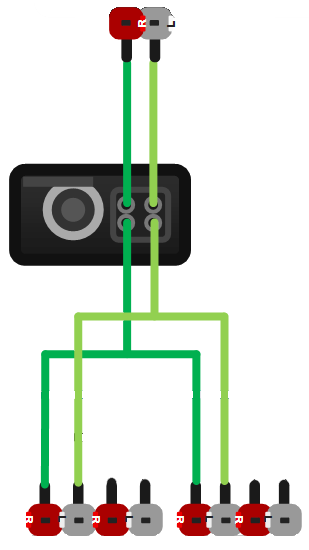
The first was amplification and signal splitting. The output from the digital controller needs to be close to the output signal strength of the turntables so that they can be balanced when I’m mixing. The digital mixer also needs to be connected to both channels of the analogue mixer so I can mix either turntable with a digital track. These two issues necessitated the introduction of a small amplifier and a Y RCA splitter.
Next was audio output. My analogue mixer doesn’t have a USB interface so I tried converting the analogue signal from the amplifier into digital with a USB converter but the result was sub-optimal audio quality. The solution was a Behringer mixer with good processing a friend donated. It’s the grey box at the bottom right:
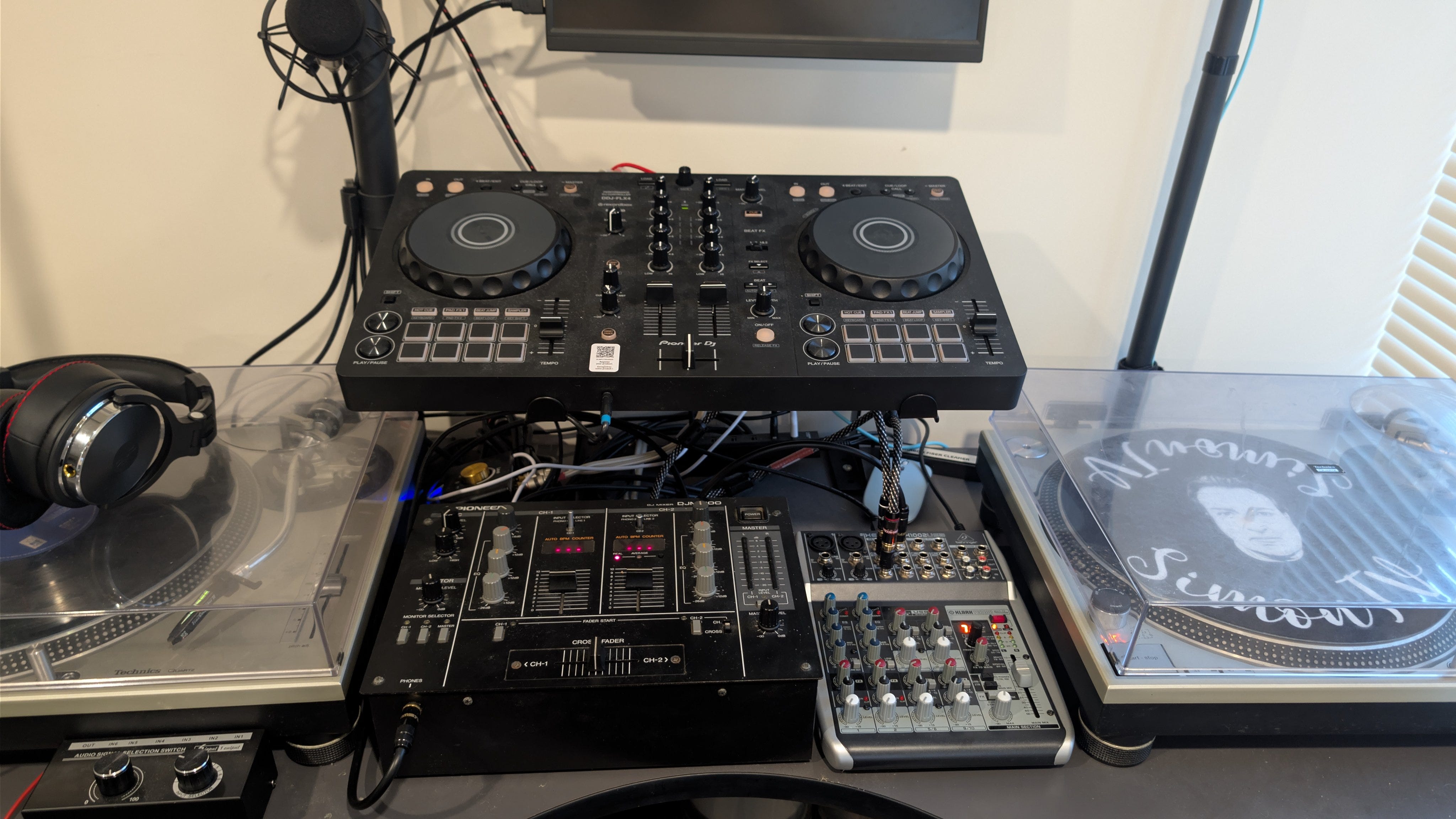
The next issue was audio monitoring, which is controlled by a little switcher (bottom left in the image.) Because I mixer tracks digitally on the top mixer and analogue with analogue/digital on the mixer at the bottom, and audio output is controlled by the Behringer, I need to monitor audio coming out of three separate components and switch my headphones between them.

The final aspect is the distribution, which occurs digitally between the two workstations. The music workstation processes all the audio generated by the components through Thimeo Stereotool. The music workstation then sends this over Ethernet using Icecast, which the broadcast workstation consumes and sends out into the world through OBS.
A problem with this I’m yet to resolve is the time it takes to process, which causes desynchronisation with the video when I’m filming. If you watch me perform right now you’ll see me cross fade from one track to another a full eight seconds before you hear it. (To be fair this is an issue which I would also need to solve in the Optimal State.)
[UPDATE 18/vi 2026: the solution for the synchronisation problem was to add a ~7 second delay with the OBS filter Video Delay (Async).]

The end result of all this is a solution which is unnecessarily complicated. I have to switch inputs and outputs when I’m performing, depending upon the sources. Every component in the chain tends to add noise so gain staging between them is crucial, and limits how much equalisation I can safely adjust when I’m live. Above all, a lot can go wrong and a failure point is difficult to identify.
Here’s the diagram again. It works and I successfully preserved existing components. Trust me when I say though, this is not the approach I recommend.
-SRA. Auckland, 13/vi 2026.